💥一文带你快速入门 uv
一个用 Rust 编写的极速 Python 包和项目管理器。
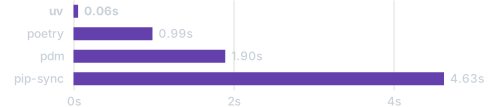
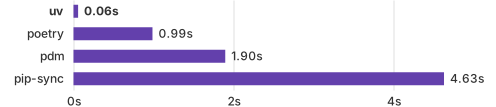
使用热缓存安装 Trio 相关依赖项。
以 0.9.11 版本为例
1. 安装程序
MacOS 和 Linux
curl --proto '=https' --tlsv1.2 -LsSf https://gh-proxy.com/https://github.com/astral-sh/uv/releases/download/0.9.11/uv-installer.sh | sh
Windows
powershell -ExecutionPolicy Bypass -c "irm https://gh-proxy.com/https://github.com/astral-sh/uv/releases/download/0.9.11/uv-installer.ps1 | iex"
2. 管理配置文件
修改 ~/.config/uv/uv.toml 或 /etc/uv/uv.toml
[[index]]
url = "https://mirrors.cloud.tencent.com/pypi/simple/"
#url = "https://mirrors.tencentyun.com/pypi/simple/" # 内网
default = true

# 以 gh-proxy 加速 Python 安装程序
python-install-mirror = "https://gh-proxy.com/https://github.com/astral-sh/python-build-standalone/releases/download"
[[tool.uv.index]]
name = "tencent"    # ⚠️ 注意不能使用中文可能会有字符集支持的问题
url = "https://mirrors.cloud.tencent.com/pypi/simple/"
#url = "https://mirrors.tencentyun.com/pypi/simple/" # 内网

[tool.uv]
python-install-mirror = "https://gh-proxy.com/https://github.com/astral-sh/python-build-standalone/releases/download"
2.1. 切换默认源
与使用 pip 换源的方式类似(这里以腾讯云源为例)。
更多换源相关内容请参考 快速设置 uv 默认源为国内镜像。
2.2. 加速安装 Python 程序
在安装不同版本的 Python 程序时,uv 会去 GitHub 下载对应的安装程序。所以需要配置对 GitHub 的加速下载。
3. 管理项目
考虑到各位开发者更多是从 pip 迁移到 uv,接下来的内容就以 pip 迁移 uv 的方式作为示例。如果是新项目请参考 创建一个新项目
3.1. 初始化
更多内容请参考:Python options
项目中已有 文件 和 仓库 的问题。
已有 文件 和 仓库 不会被覆盖:
- .git/
- .gitignore
- README.md
- main.py
3.2. 创建虚拟环境(可选)
在添加依赖时,uv 会自动创建虚拟环境。